
The inbox
Everything the Investigator is holding — every case, every watch, across every project — sits in one list in the console sidebar, ordered by a single question: does this need a human right now? There’s no separate page to open. The sidebar is the list.
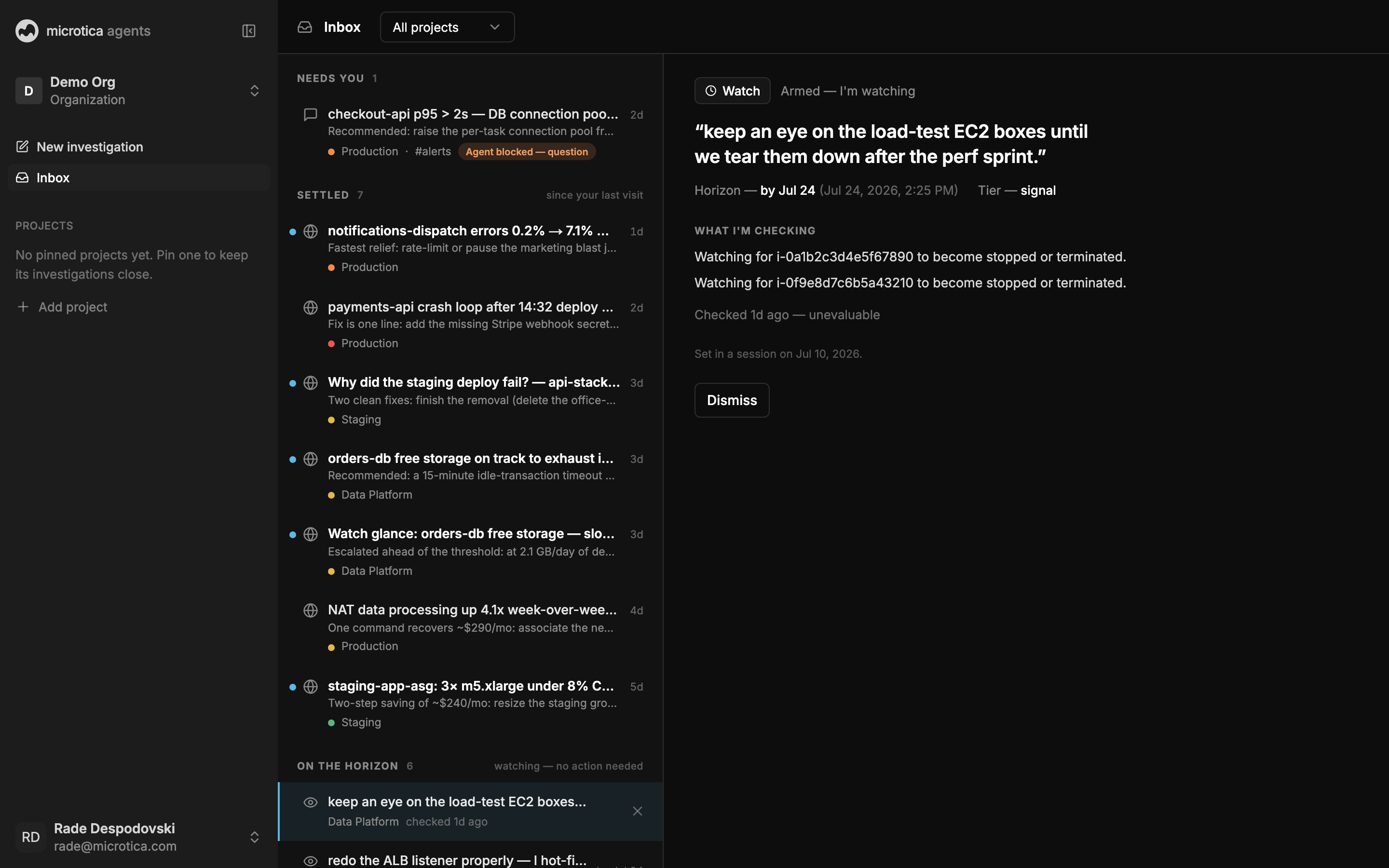 The rail sorts itself: what wants you on top, the quiet tail below.
How the list is ordered
- Needs you comes first, and renders larger — two lines, with the project and how long it’s been waiting. A case blocked on a question carries a Question chip, a run that failed carries Failed, a watch that tripped carries Fired.
- Running follows, marked Working with the elapsed time. Nothing to do; investigations move on by themselves.
- Recent is the quiet tail: one dim line each, newest activity first. This is where you pick up something you were reading. A blue dot means it changed since you last looked.
- Settled sits collapsed at the bottom with a count.
Each non-empty tier carries its own heading and count. A hairline separates Recent from the work above it, while row size, badges, and status text make the urgency clear inside each section.
When nothing needs you and nothing is running, the page says You’re clear — a result, not a blank page.
Open something
Click any row. Your own console sessions reopen as chat — you were working there a moment ago. Everything else — Slack summons, watch fires, background runs — opens as a case you can read and act on.
Above an open case sit its actions: Settle, Full session, and — when the last run failed — Retry, which re-runs the investigation as the next chapter of the same case instead of starting a new one.
Settle and restore
Settle is the clean-inbox action. Hover a row and its status swaps to a Settle button. Settling is org-wide — the case leaves the whole team’s list, not just yours — and reversible: expand Settled, hover the row, press Restore.
Watches are dismissed rather than settled, and dismissing has no undo. See Watches.
Search and scope
Press ⌘K — or the magnifier beside the organization name — to search every session, watch, and project in the organization, by title, by what’s inside a case, or by Slack channel. Each result shows its project, so two runs of the same check stay apart.
The folder chip under New investigation filters the list to one project. It’s also where you make one: open it and choose New project.
Live updates
The list keeps itself current. A case finishing, a question appearing, a watch firing — each arrives over a live server connection, with a background refresh as the safety net. Leave the tab open; it stays truthful.
Next: Work a case